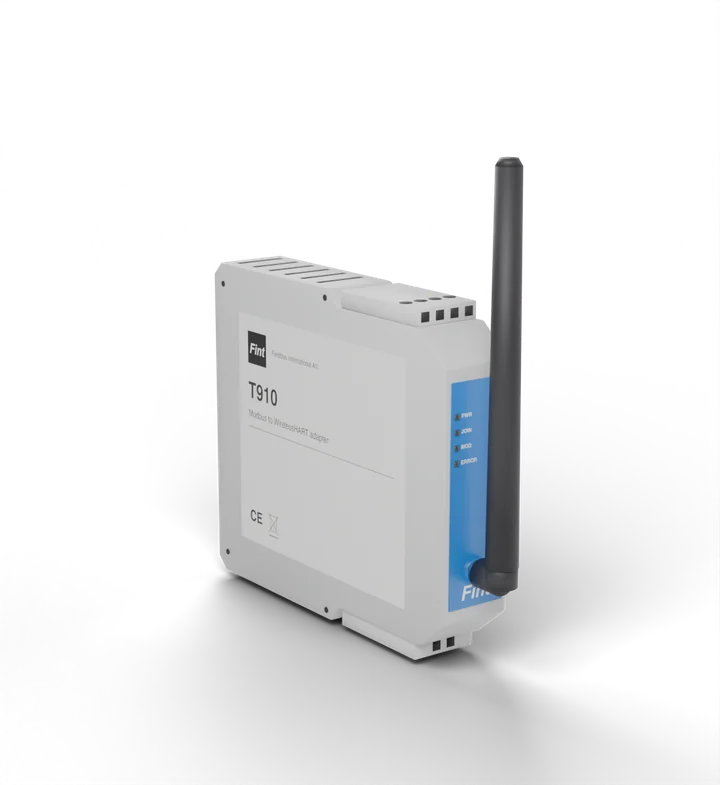
DIN rail WirelessHART adapter with Modbus RTU interface
A DIN rail module that connects Modbus RTU instruments to a WirelessHART network.
- Product code
- T910
- Product type
- DIN rail devices
- Technology
- WirelessHART
- Input
- Modbus RTU
- Output
- WirelessHART
- Documentation
- Datasheet and manual on request
Overview
It us a configurable WirelessHART slave with a Modbus Master. It publishes variables and status indicators from the Modbus device over the WirelessHART network. The Modbus RTU communication is over RS485. The device can also be delivered with a solution for Modbus TCP. T910 has a 24V supply voltage and has LEDs for power, join status, bursting and Modbus traffic and Modbus termination. On the front panel there is a connector for a handheld configurator. The T910 is based on Fieldbus Inc.’s embedded WirelessHART converter, the T810.
The T910 interface allows up to 8 device variables (floating point or integer) and an extensive array of device status indicators to be passed from the Modbus device over the WirelessHART network.
The T910 includes a wired HART communication channel to provision the device for joining the WirelessHART network and configure the strategy for publishing variables.
T910 can be configured to publish measurements according to a time schedule or level triggered. T910 can also be configured to publish events. Four Burst command configurations are supported. The Real Time Clock is active when connected to a WirelessHART network.
Applications
The T910 is intended for integration of existing Modbus instruments into a WirelessHART network. Examples are manufacturers of measurement devices, detectors, and analyzers who want to offer WirelessHART capabilities in their Modbus instruments.
Related products
All products
Tell us about your instrument and network. We'll recommend the right board, gateway or stack and send a quote.